

Laravel is an open-source PHP framework, Which is widely used for web application development using PHP. Laravel provides the reusability of the code. And well-structured formatting of the code and files. It has a rich collection of libraries for different tasks.
It provides pre-installed libraries that are useful for most web applications. The highly optimized code increases the loading speed of the application. It provides a large collection of features than any other PHP framework
Here we will learn about Unit Test Cases in laravel
Create Project and Setup Project
Composer create-project Laravel/Laravel test project
After the project creates successfully. You need to change the database configuration in .env
DB_CONNECTION=mysql

DB_HOST=127.0.0.1

DB_PORT=3306

DB_DATABASE=laravel

DB_USERNAME=root

DB_PASSWORD=
Create Test API
Create controller :
PHP artisan make: controller UserController
Write the below code in the UserController.php
<?PHP

namespace App\Http\Controllers;
use Illuminate\Http\Request;
class UserController extends Controller

{
    public function AddTwoNumbers(Request $request)
    {
            //Defining rules for input validation

            if ($request->no1 == "" || !isset($request->no1)) {
                $response_data = [
                    "error" => true,
                    "message" => "no1 is required",
                    "status" => "Precondition Failed",
                    "status_code" => 412,
                    "data" => "",
                ];
                return response($response_data, 412)->header('Content-Type', 'text/Json');
            }

            if ($request->no2 == "" || !isset($request->no2)) {
                $response_data = [
                    "error" => true,
                    "message" => "no2 is required",
                    "status" => "Precondition Failed",
                    "status_code" => 412,
                    "data" => "",
                ];
                return response($response_data, 412)->header('Content-Type', 'text/Json');
            }

            if (!is_numeric($request->no1)) {
                $response_data = [
                    "error" => true,
                    "message" => "no1 should be numeric",
                    "status" => "Precondition Failed",
                    "status_code" => 412,
                    "data" => "",
                ];
                return response($response_data, 412)->header('Content-Type', 'text/Json');
            }

            if (!is_numeric($request->no2)) {
                $response_data = [
                    "error" => true,
                    "message" => "no2 should be numeric",
                    "status" => "Precondition Failed",
                    "status_code" => 412,
                    "data" => "",
                ];
                return response($response_data, 412)->header('Content-Type', 'text/Json');
            }

            //Check user credential

            if($request->no1 == "0"){
                $response_data = [
                    "error" => true,
                    "message" => "no1 should be greater than zero",
                    "status" => "Precondition Failed",
                    "status_code" => 412,
                    "data" => "",
                ];
                return response($response_data, 412)->header('Content-Type', 'text/Json');
            }
            if($request->no2 == "0"){
                $response_data = [
                    "error" => true,
                    "message" => "no2 should be greater than zero",
                    "status" => "Precondition Failed",
                    "status_code" => 412,
                    "data" => "",
                ];

                return response($response_data, 412)->header('Content-Type', 'text/Json');
            }

            $sum = $request->no1+$request->no2;
            $response_data = [
                "error" => true,
                "message" => "Numbers added successfully",
                "status" => "Success",
                "status_code" => 200,
                "data" => $sum,
            ];

            return response($response_data, 200)->header('Content-Type', 'text/Json');
    }
}
And paste the below code in routes\api.PHP
<?PHP
use Illuminate\Http\Request;
use Illuminate\Support\Facades\Route;
use App\Http\Controllers\UserController;
Route::post('AddTwoNumbers', [UserController::class, 'AddTwoNumbers']);
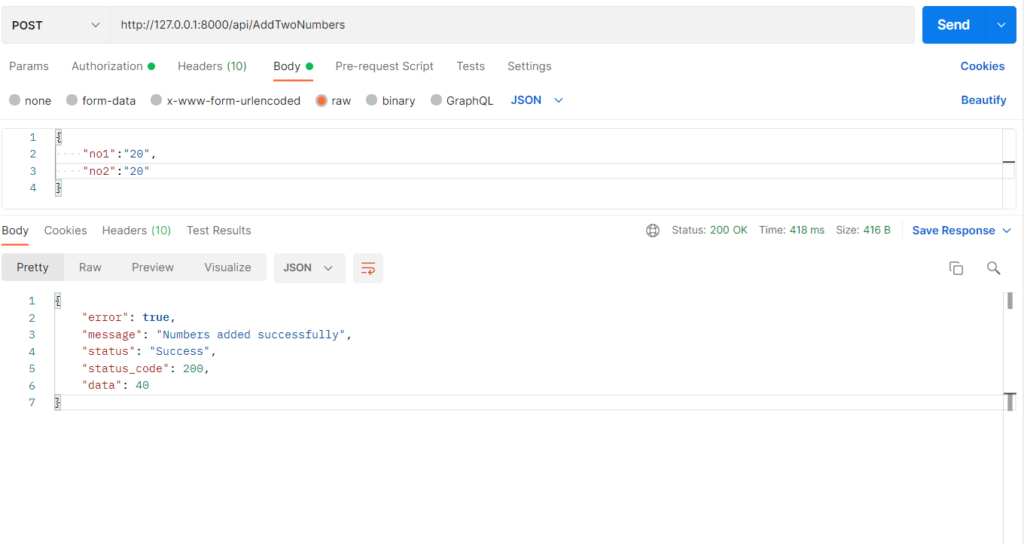
Now check if the API is working. Run below command
PHP artisan serve
Read Also:- How to Install The Telescope In Laravel

Create Your First Unit Test Case
Run the below common in terminal: PHP artisan makes test UserTest –unit Past the below code in the AddTwoNumberTest file. This file contains the data providers, payload, and test function. Pls, read them carefully.
<?php
namespace Tests\Unit;
use Tests\TestCase;
class AddNumbersTest extends TestCase
{
    // /* AddTwoNumbers Api Data Provider */
    public function AddTwoNumbersApiDataProvider()
    {
        //test with all correct parameters
        $AddTwoNumbersWithAllParameter = AddNumbersTest::addtownumberPayload();
        //test without no1
        $AddTwoNumbersWithoutNo1 = AddNumbersTest::addtownumberPayload();
        unset($AddTwoNumbersWithoutNo1->no1);
        //test without no2
        $AddTwoNumbersWithoutNo2 = AddNumbersTest::addtownumberPayload();
        unset($AddTwoNumbersWithoutNo2->no2);
        //test without no2 invalid value
        $AddTwoNumbersWithInvalidDataTypeNo2 = AddNumbersTest::addtownumberPayload();
        $AddTwoNumbersWithInvalidDataTypeNo2->no2 = "value";
        //test without no1 invalid value
        $AddTwoNumbersWithInvalidDataTypeNo1 = AddNumbersTest::addtownumberPayload();
        $AddTwoNumbersWithInvalidDataTypeNo1->no1 = "value";

        return array(
            'AddTwoNumbersWithAllParameter' => [$AddTwoNumbersWithAllParameter, 200],
            'AddTwoNumbersWithoutNo1' => [$AddTwoNumbersWithoutNo1, 412],
            'AddTwoNumbersWithoutNo2' => [$AddTwoNumbersWithoutNo2, 412],
            'AddTwoNumbersWithInvalidDataTypeNo2' => [$AddTwoNumbersWithInvalidDataTypeNo2, 412],
            'AddTwoNumbersWithInvalidDataTypeNo1' => [$AddTwoNumbersWithInvalidDataTypeNo1, 412]
        );
    }
     /* AddTwoNumbers API Test Cases */
    /** @dataProvider AddTwoNumbersApiDataProvider */
    public function test_AddTwoNumbers($payload, $status)
    {
        print_r($payload);
        $response = $this->post('/api/AddTwoNumbers', (array) $payload);
        $response->assertStatus($status);
    }
    public static function addtownumberPayload()
    {
        return (object) [
            'no1' => 1,
            'no2' => 1
        ];
    }
}
Now your test cases are ready to run. Use the below command to execute the test cases
Read Also:- How to Install CodeIgniter4?
PHP Artisan Test

Congratulations you have successfully run the Unit test cases with dataProviders in Laravel.
If you are interested in even more development-related articles and information from us here at Devstringx, then we have a lot to choose from for you.